
Method of Payment
Local Participants
Payment Can Only Be Made After The Submission Is Accepted
(Please note that there is no refund for cancellation from the participant)
1) UTM e-Commerce System (MEPS FPX & Credit Card)
Note:
- The system will auto-generate an electronic receipt (softcopy) which can be used for grant claiming at RMC UTM.
- The payer’s name will appear on the receipt.
- Payment tutorial:https://youtu.be/KGtGqDSdVzw
Step 1: Go to the e-Commerce Portal: https://ecommerce.utm.my/v3/
Step 2: Select Make Payment > Select Category ‘[08] CONFERENCE’ > Search for payment code according to your category (UTMxxx).
| CATEGORY | FEE |
| ORAL PRESENTER |
RM500 CODE: UTM1149 |
| ORAL PRESENTER (VIRTUAL) |
RM350 CODE: UTM1150 |
| POSTER PRESENTER |
RM450 CODE: UTM1151 |
| PARTICIPANT |
RM400 CODE: UTM1152 |
Step 3: Choose the right category and make payment via FPX or debit/credit card.
Step 4: Download the transaction receipt.
2) Bank Draft/ Cheque
Step 1: Cheque should be crossed out and made payable to BENDAHARI UTM
Step 2: Please mail the bank draft/cheque to:
Secretariat
International Conference on Student and Disabled Student Development 2023
Block H01, Kolej Tun Fatimah
Universiti Teknologi Malaysia
81310 UTM Johor Bahru, Johor, Malaysia
Attn : Dr. Noor Mala binti Ibrahim (017-4756548)
Ts. Dr. Syamsul Hendra bin Mahmud
Ar. IDr. Ts. Noraslinda binti Abdul Rahman
3) Direct to Account (Local Bank only)
Step 1: Login to the Internet or Mobile Banking > Select ‘Pay & Transfer’ > Select ‘DuitNow /Transfer Money/Transfer’ to
Account Name : BENDAHARI UTM
Bank : CIMB BANK BERHAD
Account No. : 8006053536
Enter Transaction Instruction / Recipient’s Reference:
Reference 1 : ICOSD 2023
Reference 2 : Name of Presenter / Participant
Email : icosd@utm.my
Step 2: Confirm payment.
Step 3: Download transaction receipt
International Participants
Payment Can Only Be Made After The Submission Is Accepted
(Please note that there is no refund for cancellation from the participant)
1) Flywire UTM
Note:
- Payment must be made in MYR currency only.
- Conference Code: ICOSD2023
- Payment tutorial via Flywire: https://youtu.be/yMpOoc5jOYY
Step 1: Go to the Flywire Portal: https://utm-conference.flywire.com
Step 2: Select a Country or Region and Universiti Teknologi Malaysia (UTM) – Conference receives: insert Conference Fee based on the category registered
| CATEGORY | FEE |
| ORAL PRESENTER | RM500 |
| ORAL PRESENTER (VIRTUAL) | RM350 |
| POSTER PRESENTER | RM450 |
| PARTICIPANT | RM400 |
Step 3: Select Preferred payment method (Bank Transfer/Credit Card/Online) > Provide the details of the person whose card/bank account will be used to pay
Step 4: Provide participant information and Conference Code: ICOSD2023
Step 5: Review and confirm payment information > Make payment
Step 6: Download the payment receipt
What should I do after I make the payment?
After payment has been made, a copy of the payment slip/proof (save/scanned in PDF) MUST be uploaded to the conference registration’s Google form which will be updated once the registration form is created.
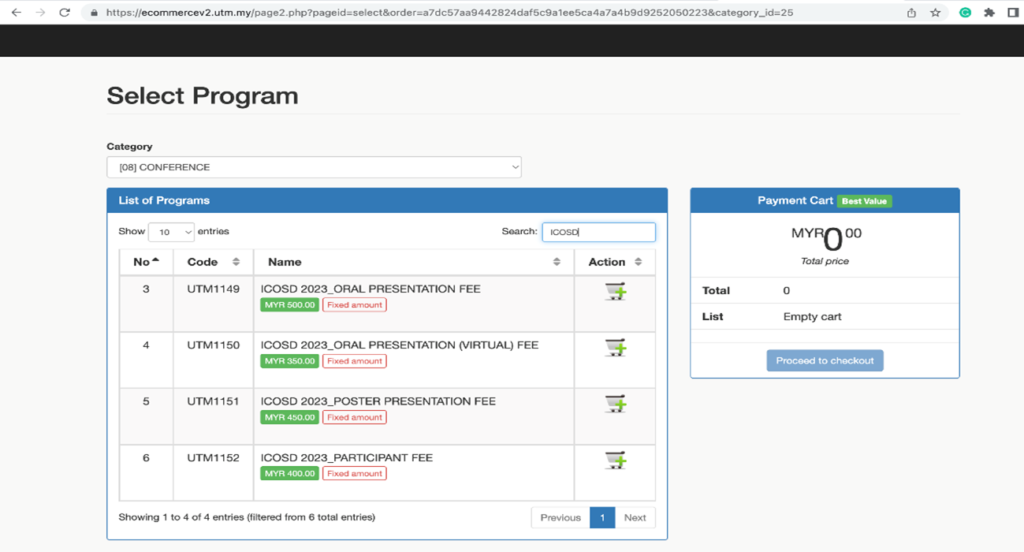
Figure 1 UTM e-Commerce portal
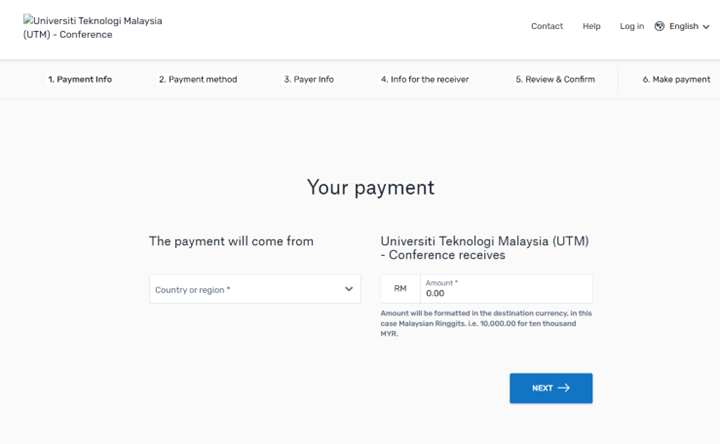
Figure 2 Flywire UTM Conference portal
2) Bank Draft/ Cheque
Step 1: Cheque should be crossed out and made payable to BENDAHARI UTM
Step 2: Please mail the bank draft/cheque to:
Secretariat
International Conference on Student and Disabled Student Development 2023
Block H01, Kolej Tun Fatimah
Universiti Teknologi Malaysia
81310 UTM Johor Bahru, Johor, Malaysia
Attn : Dr. Noor Mala binti Ibrahim (017-4756548)
Ts. Dr. Syamsul Hendra bin Mahmud
Ar. IDr. Ts. Noraslinda binti Abdul Rahman
3) Direct to Account (Local Bank only)
Step 1: Login to the Internet or Mobile Banking > Select ‘Pay & Transfer’ > Select ‘DuitNow /Transfer Money/Transfer’ to
Account Name : BENDAHARI UTM
Bank : CIMB BANK BERHAD
Account No. : 8006053536
Enter Transaction Instruction / Recipient’s Reference:
Reference 1 : ICOSD 2023
Reference 2 : Name of Presenter / Participant
Email : icosd@utm.my
Step 2: Confirm payment.
Step 3: Download transaction receipt
